Interactive Props
Grabbables
- Drag a Static Mesh Actor into the level.
- Set Static Mesh and materials.
- Details → Actor → Tags → add
VRGrab(or tick Grabbable in the VR Realms panel).
In-game it becomes a physics prop players can pick up, throw, and hand to each other.
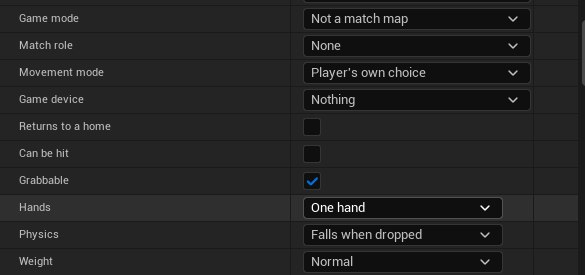
Grab options
| Setting | Options | What it does |
|---|---|---|
| Hands | One hand / Two hands | Two hands allows a second grip; doesn’t require it. Steadies long objects. |
| Physics | Falls / Stays / Floats | Normal prop, shelf prop, or zero-g. |
| Weight | Light 0.5 kg / Normal / Heavy 25 kg | Normal uses mesh mass; others override. |
Tags are case-insensitive and combinable (e.g. VRGrab.TwoHand + VRGrab.Heavy). If both Heavy and Light, Heavy wins.
VRItem.*, VRPortal.*). If an actor has an item tag, grab tags are ignored completely.Returns to its spot
Tick Returns to its spot in Details, VR Realms, and the prop goes back to where you placed it when players leave it somewhere else. Once it has sat away from its spot with nobody holding it for the time you set, it dissolves and materializes back in place, and everyone in the world sees it happen.
- After (seconds) sets the wait. 60 is normal, and anything from 5 seconds to an hour works.
- Picking it up restarts the clock, so it never vanishes out of someone's hand.
- Good for drinks, tools, balls and anything that should not end up scattered across your map.
The tag it writes is VRReturn, or VRReturn.120 for a custom time. This is different from Returns to a home, which is the game mode setting that sends a ball back to a Home marker.
Held in hand
Tick Held in hand in Details, VR Realms, on a grabbable that should sit in the hand a certain way: a fishing rod, a torch, a tool. You place it once in the editor and the game holds it there.
- Tick Preview. If the kit asks for one, pick a Preview body: any skeletal mesh with
hand_randhand_lbones, your own avatar included. - The body stands beside your item with a copy of the item in its hand. Move and turn the copy until it sits right. Your item in the level does not move.
- The grip is saved on the item each time you let go of the copy. Untick Preview when you are done. The body and the copy are never saved with the level.
| Setting | What it does |
|---|---|
| Hand | Right hand, left hand or either. Changing the hand mirrors the grip you placed. Either is held in the right hand for now. |
| Hold animation | Optional. The pose the item is held in. The preview body takes it, and from the next update a desktop player holding the item plays it while standing still. |
| Clip time (seconds) | Shows any moment of the Hold animation on the preview body, so you can place the item in the pose that matters. |
| Start again | Forgets the grip. The next Preview starts with the middle of the item in the hand. |
A Hold animation, and the skeleton it was made on, must be inside your map’s folder. The pak holds only that folder, so a clip that lives anywhere else does not reach the game.
In game, a desktop player presses E on the prop and it goes into the hand at your grip. E again puts it down.
Collision
Your mesh needs collision to throw or simulate. No collision = no physics. Add Simple Collision on the Static Mesh, or set Collision Complexity appropriately.