Things to add
Things to add
Two ways, both without Blueprints: drag ready made things in from the Realms page, or make any mesh of your own something players can pick up, with one tick in Details.
Ready made. Screens, mirrors, weapon pads, game rules and more. You place a box with an arrow; when the world loads, the game puts the real thing there: the TV, the mirror, the rifle. It is the same for every player and always the game’s newest one. Nothing of the kit ships in your pak.
Your own mesh, grabbable. Drag any mesh from your Content Browser into the level, select it, and tick Grabbable under VR Realms in Details. Players pick it up, throw it and hand it to each other, for everyone in the world. Grabbables
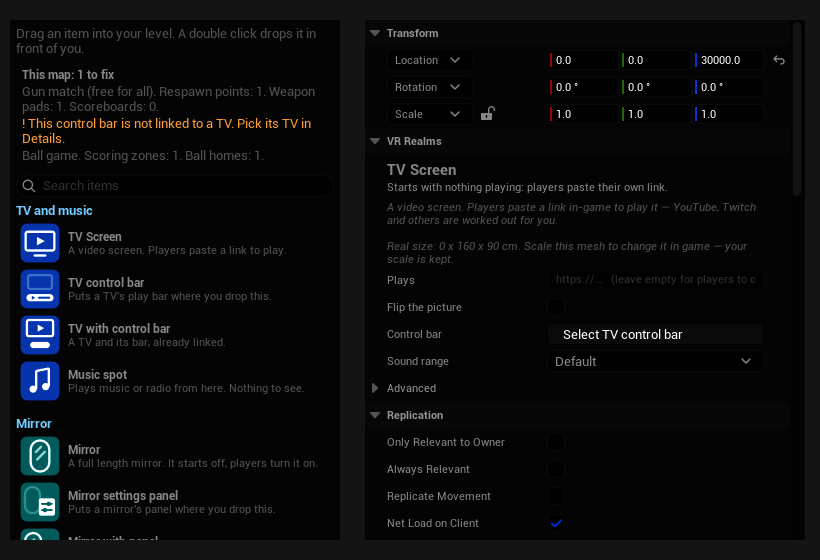
Ready-made items
The Realms page: 33 items in eight groups. Drag one in, or a whole set that arrives linked.
Grabbables
Your own mesh that players pick up, throw, hand over and hold. One tick.
The Details panel
What the box and its arrow mean, what Details shows, your own mesh as a screen or a gun rack, and movement zones.
First time?
Step 4 of the beginner path puts a TV and a thing to grab into a level, with a picture for each move: Add things.
More to add
- Cars players drive together
- Game modes: gun matches, volleyball, soccer, races
- Sound and music that follow the players’ volume sliders
- Creator dares that pay gold